Best Space-Saving Smart Gadgets for Small Apartments: Professional Picks to Maximize Functionality and Style
You can make a small apartment feel smarter and more spacious without overloading every surface. This article shows practical, renter-friendly smart gadgets that earn their spot by saving space, simplifying daily tasks, and improving comfort and security.
Expect concise recommendations that help you choose compact devices which boost functionality while keeping your home uncluttered. The following sections explore lighting, power and charging, security, climate control, compact appliances, and ways to integrate technology so your space stays efficient and stylish.
1) Philips Hue White and Color Ambiance Bulb
The Philips Hue White and Color Ambiance bulb delivers millions of colors and tunable whites in a single A19 form factor, making it a versatile option for small apartments. It fits standard fixtures and replaces multiple lamps or accent lights, saving floor and table space.
It connects via Zigbee to a Hue Bridge for the most reliable control and advanced automations, or can work over Wi‑Fi with select setups. Users can set schedules, scenes, and remote control to reduce the need for extra switches or controllers.
Its color range supports mood lighting, task illumination, and circadian-friendly tunable white, so one bulb can serve several functions in a compact living area. It also integrates with popular voice assistants, simplifying hands-free control in tight spaces.
2) Wyze Plug Smart Plug
The Wyze Plug offers compact, affordable smart control for small apartments. It fits into tight outlets without blocking adjacent sockets, which helps preserve limited wall space.
It connects over 2.4 GHz Wi‑Fi and requires no hub, so tenants can set it up quickly. Users can control lamps, fans, or other small appliances from a phone or with Alexa and Google Assistant voice commands.
Wyze’s app supports scheduling and Rules automations, allowing lights or devices to turn on and off automatically. The plug does not include native HomeKit/Matter support or built‑in energy metering, so it may not suit users who need those features.
Its low price and straightforward functionality make it a practical choice for renters and small‑space dwellers who want basic smart control without bulky hardware.
3) Anker 3-in-1 Cube USB Charging Station
The Anker 3-in-1 Cube combines wireless charging for a phone, Apple Watch, and earbuds into a compact, cube-shaped unit. It saves surface space compared with separate chargers and fits easily on a nightstand or small desk.
It supports MagSafe-compatible alignment for faster, more reliable phone charging and offers up to 15W wireless output for suitable devices. The phone pad pivots, letting users charge in portrait or landscape orientation for viewing or video calls.
Its foldable, portable design and included 30W USB-C power adapter and cable make it ready for travel or daily use. The USB-C input simplifies power sourcing and reduces cable clutter compared with older DC-only multi-chargers.
Anker includes an 18-month warranty and customer support, which can be useful in small living spaces where a single reliable charger must serve multiple devices. The unit prioritizes convenience and tidy organization rather than replacing wired fast-charging speeds for all device types.
4) Eufy Security Solo IndoorCam C24
The Solo IndoorCam C24 packs 2K video into a compact, plug-in body that fits on shelves or window sills without taking much room. It records clear footage for monitoring small living spaces and supports two-way audio for quick check-ins.
It offers local microSD storage, avoiding mandatory cloud subscriptions if the user prefers on-device recording. The camera also includes night vision and AI-based human and pet detection to reduce false alerts.
Setup is straightforward via the Eufy app and it works with common voice assistants for simple hands-free control. Its small footprint and flexible placement make it suitable for apartments where space and aesthetics matter.
5) Ecobee SmartThermostat with Voice Control
The Ecobee SmartThermostat with Voice Control saves floor and wall space by replacing a bulky HVAC controller with a slim, wall-mounted unit. It integrates remote room sensors so temperature control focuses on occupied spaces rather than a single thermostat location.
It includes built-in voice assistant support, so users can control climate and smart-home devices without adding another speaker. The touchscreen remains compact while offering clear controls and notifications.
Energy-saving scheduling and learning features can reduce heating and cooling use, which matters in small apartments where inefficient layouts amplify temperature swings. It also works with major smart home platforms for seamless automation.
Installation typically fits standard wiring setups, keeping additional hardware minimal. For renters, pairing with a portable smart sensor or confirming compatibility with building systems helps avoid surprises.
6) Yoto Mini Smart Speaker for Kids and Adults
The Yoto Mini is a compact, screen-free audio player built for portability and simplicity. It uses physical audio cards or Bluetooth streaming, so it fits easily on a narrow shelf or bedside table in a small apartment.
Its controls are tactile and child-friendly, reducing the need for additional space-consuming accessories or displays. Battery-powered operation and USB-C charging make it convenient for moving between rooms without cables.
Content ranges from stories and music to podcasts, appealing to both children and adults who prefer focused audio without screens. Parental controls and a modest volume range help maintain safe listening in close quarters.
The Mini’s small footprint and straightforward setup support clutter-free living spaces. It functions as a dedicated speaker for relaxation, bedtime routines, or background audio during cooking and work, without dominating limited square footage.
7) SwitchBot Smart Curtain 2
The SwitchBot Smart Curtain 2 retrofits existing curtains and installs in about 30 seconds without tools, making it ideal for renters and small apartments. It converts manual curtains into motorized units that open and close on schedules or via app control.
It supports voice assistants and, with an optional hub, adds remote Wi‑Fi access and HomeKit/Matter compatibility. The unit is compact and mounts to rods or tracks, saving space compared with full smart shade replacements.
Battery-powered operation reduces wiring needs; users can recharge the unit rather than reconfigure sockets. It also pairs with other SwitchBot devices for basic home automation routines.
Performance suits everyday use, though advanced integrations require the separate hub. The SwitchBot Smart Curtain 2 offers a practical, low‑impact way to add automation without replacing existing window treatments.
8) Ninja Foodi 11-in-1 Indoor Grill (space-saving countertop)
The Ninja Foodi 11-in-1 Indoor Grill combines multiple cooking modes in one compact footprint, helping small-apartment dwellers reduce countertop clutter. It functions as a grill, air fryer, toaster oven, and more, so tenants can replace several single-use appliances.
It uses a controlled heating system and a smoke-reduction design to minimize kitchen fumes, which suits close-quarters living. The grill’s vertical or horizontal rack options maximize usable space while accommodating different meal sizes.
Cleanup stays manageable thanks to nonstick surfaces and removable components that fit most sinks or dishwashers. The unit’s design balances capacity with a slim profile, making it practical for tight kitchens and limited storage.
9) iRobot Roomba j7+ (self-emptying)
The Roomba j7+ pairs compact hardware with a self-emptying Clean Base that reduces how often occupants handle dust and debris. It stores several weeks of dirt in the base, which saves floor and closet space otherwise used for vacuum storage.
PrecisionVision Navigation helps the unit avoid common obstacles like cords and pet waste, improving reliability in tight layouts. It creates smart maps and adapts to a home’s routine, so it cleans efficiently without frequent interventions.
Suction performance suits mixed floors in small apartments, and the low-profile design slides under many furniture pieces. The docking station is larger than the robot, but it consolidates storage and waste disposal, which benefits limited-space living.
10) Tile Slim Wallet Finder
The Tile Slim slips into a wallet, passport holder, or luggage tag without adding bulk. It measures about the thickness of two credit cards, making it a practical fit for small apartments where minimizing clutter matters.
It pairs with iOS and Android devices through the Tile app, enabling quick ring-and-find when the tracked item sits nearby. The app also shows the last known location on a map, which helps when an item is left at a café or in another room.
Battery life is limited compared with larger trackers, and the Slim relies on Bluetooth range and nearby Tile/Life360 network users for extended locating. It nevertheless offers simple setup and straightforward operation for people who prioritize compact, unobtrusive tracking.
The device doubles as a phone finder: pressing the Tile can make a paired phone ring even if it’s on silent. For renters and small-space dwellers, it provides a low-profile way to keep essential items accessible without extra equipment crowding living areas.
Integrating Smart Technology Into Compact Living Spaces
Smart devices should work reliably, fit stably, and draw minimal power. Prioritize a strong local network, strategic placement for multiuse, and simple power strategies to keep the apartment uncluttered and efficient.
Addressing Connectivity Challenges
They should start by mapping Wi‑Fi dead zones with a phone-based speed test and noting where devices will sit. If a router sits in a corner, place a mesh node or wired access point near dense device clusters such as the kitchen and living area to maintain 150–300 Mbps for streaming, cameras, and voice assistants.
For devices that support 2.4 GHz and 5 GHz bands, assign high-bandwidth items (TV, laptop) to 5 GHz and low-bandwidth sensors (locks, bulbs) to 2.4 GHz to reduce congestion. Enable WPA3 where possible, change default passwords, and isolate IoT devices on a guest VLAN to limit lateral access from compromised gadgets.
When wired runs are possible, use Power over Ethernet (PoE) for cameras and access points to avoid extra adapters. Finally, monitor network load with a basic router app weekly and schedule firmware updates during off-peak hours to minimize interruptions.
Optimizing Device Placement
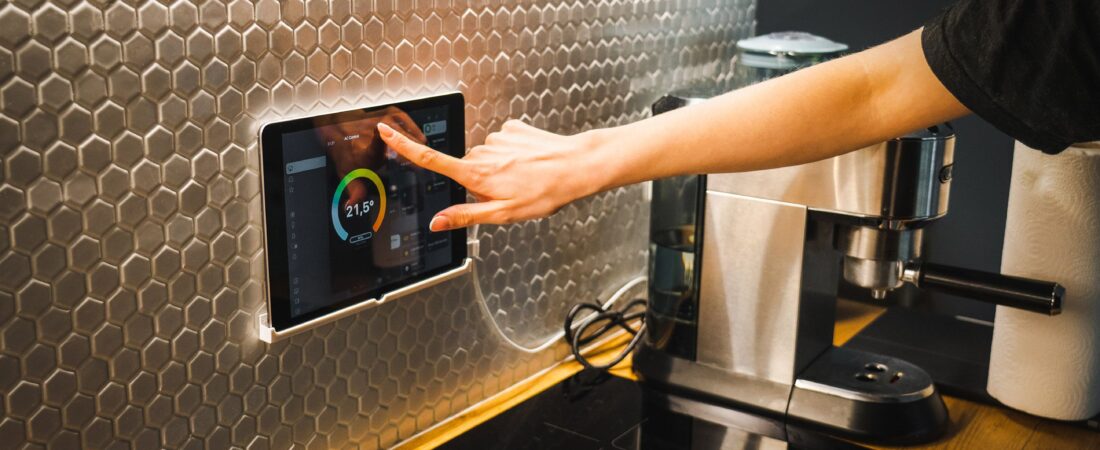
Place multifunction devices where they serve multiple activities. For example, mount a smart display near the kitchen counter for recipes and timers, and angle motion sensors to cover entryways without false triggers from curtains or pets.
Keep Bluetooth hubs and smart speakers within 3–6 meters of voice control zones for reliable voice pickup. For cameras and sensors, aim for 2–2.5 meter mounting height: that captures faces and reduces blind spots while remaining unobtrusive. Avoid placing heat-sensitive devices like smart thermostats above radiators or direct sunlight.
Use vertical space: install wall-mounted folding desks, motorized shelves, or ceiling-mounted drying racks that integrate with smart controllers. Label ports and cables, and group device power sources in one accessible cabinet to simplify maintenance and reduce visible clutter.
Power Management Solutions
They should pick smart plugs and strips with energy monitoring to track per-device consumption and identify power hogs. Set schedules for high-draw appliances (space heaters, dehumidifiers) to limit runtime and prevent circuit overloads in older buildings.
For battery-powered sensors, choose models with multi-year battery life and enable low-power modes; configure push notifications for low battery rather than polling frequently. Consider a small UPS for critical devices like the router and mesh nodes to keep the network and security cameras online during short outages.
When integrating multiple devices, calculate total load on individual circuits and avoid running heavy appliances on the same outlet cluster as smart hubs. Use surge protectors with EMI filtering for entertainment centers to protect sensitive electronics and reduce interference.
Maximizing Functionality Without Sacrificing Style
This section focuses on selecting compact smart gadgets that deliver clear utility while fitting a cohesive visual scheme. It highlights design cues, material choices, and practical placement strategies that preserve room flow and surface area.
Choosing Minimalist Designs
They should prioritize devices with simple silhouettes and neutral finishes that blend into a room’s palette. Look for smart speakers, chargers, and lights with matte black, white, or muted metal finishes and slim profiles to avoid visual clutter.
Choose multi-function units — for example, a lamp with built-in wireless charging or a smart speaker with an integrated display — to reduce the number of standalone devices on counters and nightstands.
Pay attention to scale: a compact router or cube charger fits on a shelf, while oversized designs dominate small rooms. Select gadgets with hidden cables or included cable-management accessories to maintain clean sightlines.
Also check mounting options; wall- or under-cabinet mounts free up surface area and keep devices accessible without crowding tabletops.
Balancing Aesthetics and Utility
They must assess both performance and appearance before purchase. Compare specs like connectivity range, battery life, and app stability alongside dimensions and color options to ensure the device actually improves daily routines.
Prioritize items that solve specific problems: a robotic vacuum sized for narrow gaps, a foldable smart display that tucks away, or modular storage with integrated lighting. These choices deliver measurable benefits and reduce the need for extra items.
Create visual harmony by grouping devices with complementary finishes and consistent scale. Use small trays or low-profile shelves to corral frequently used gadgets, which preserves style while keeping devices ready.
Finally, consider upgradeability and serviceability; a well-built item with replaceable parts extends usefulness and avoids future clutter from disposable tech.